

School admin has a way of expanding to fill every spare gap in your head. One email turns into three follow-ups, a newsletter hides a date you nearly miss, and a WhatsApp message sends you back looking for the original attachment. This is where AI can genuinely help, not by taking over the thinking for you, but by helping you draft, summarise and organise the parts that are easy to put off.
Quick summary
AI can help with school emails and admin, but it works best as a drafting and organising tool, not a replacement for judgement, so the time-saving part only really works if you keep the final check with you.
For most parents, the useful part is not letting AI speak on your behalf without checking it. It is using it to make school communication feel clearer, calmer and easier to manage:
- AI can help draft school emails, tighten your wording and turn a rambling message into something clearer and more polite.
- It can summarise newsletters, long messages and updates so you can spot dates, actions and reminders more quickly.
- It can also help turn school information into a simple to-do list, calendar checklist or set of questions you still need answered.
- It works best when you already know roughly what you want to say and need help making it clearer, warmer or more organised.
- The output still needs your final check, especially for tone, facts, deadlines, names and anything sensitive.
This article is for / not for
This article is for:
- Parents who feel overloaded by school emails, newsletters, forms and reminders
- Families who want a quicker way to deal with school admin without sounding robotic
- Parents who want help drafting messages, summarising updates and pulling out dates or action points
- Adults who want a calmer way to handle school communication using the AI tool they already have
This article is not for:
- Parents who want AI to send school emails on their behalf without checking them
- Anyone looking for legal, safeguarding or medical advice from a chatbot
- Families who mainly want general AI prompt ideas across lots of topics
- Parents looking for a technical guide to how AI tools work
Where AI actually helps with school admin
A lot of school admin is not difficult in itself. It is difficult because it arrives in fragments, often when you are already busy, and it needs a mental gear change every time.
That is why AI can be so useful here. It helps with the jobs that are small on paper but draining in practice. That includes things like turning your rough notes into a clear email, summarising a newsletter, extracting dates from a long message, or turning a list of updates into a simple set of next steps.
I have found it especially useful when I know what I mean, but do not want to spend twenty minutes trying to make it sound measured, clear and less emotional than I intended. It also helps me make sure I have actually got my points across, without spending ages rewriting things or second-guessing myself.
The sweet spot is this: use AI to reduce friction, not to replace judgement. Let it help with drafting, sorting and structuring. Keep the tone, context and final decision with you.
If you want the broader picture around where AI fits into family life more generally, AI for Parents: Practical Ways to Use AI in Everyday Family Life sets that out clearly.
Using AI to draft and refine school emails
School emails are one of the easiest ways for parents to use AI because the main issue is usually not what happened. It is how to say it clearly.
A typical example might be wanting to explain that your child has been anxious about PE, ask whether homework expectations have changed, or check whether an absence needs anything else from you. You may already know the facts, but still feel stuck on how to phrase the message without sounding abrupt, flustered or over-explanatory.
A practical starting prompt might look like this:
“Write a short, polite email to my child’s primary school teacher explaining that my child has been anxious about PE lately and I would like a quick conversation. Keep it warm, clear and natural, not too formal.”
You can do the same for other common school-admin tasks, such as:
- asking a teacher a follow-up question without sounding confrontational
- tightening a long draft into a shorter, calmer message
- turning bullet points into a clear email
- rewriting something so it sounds respectful and straightforward rather than defensive
It can also help you think of sensible questions to ask, which is useful if you know there is something you need clarified but your brain keeps circling around it. For example, you might ask AI to suggest three polite follow-up questions about homework expectations, PE arrangements or a school trip letter.
Using AI to summarise school newsletters and messages
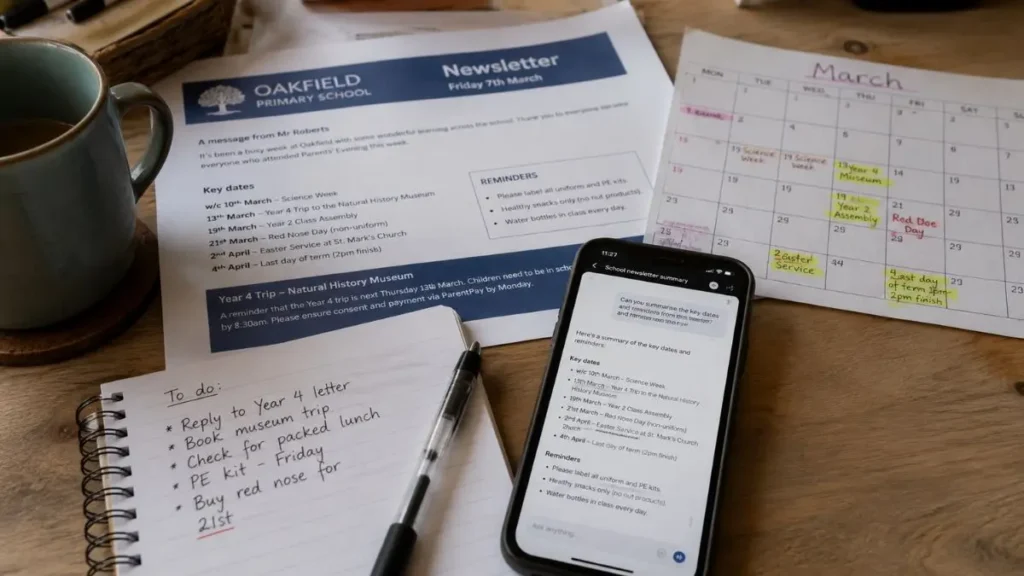
A simple next step after that is to drop the dates into your calendar or turn the summary into a quick list of things you actually need to do.
This is one of the most practical uses of AI, especially if you are the person who keeps meaning to read the newsletter properly and then realises three days later that there was a non-uniform day, a trip payment deadline and a request for a costume.
AI can help by taking a long message and pulling out the parts that matter most. That might mean:
- summarising a newsletter into the five things you actually need to know
- extracting dates, deadlines and items to bring
- turning an update into a quick to-do list
- grouping information into categories such as payments, events, forms and reminders
This can be useful for school newsletters, long parent-app updates, or even a fast-moving parents’ WhatsApp chat where the important part gets buried under replies. To save time, you do not have to type everything out either. You can copy and paste the message, take a screenshot, or even take a clear photo of a letter and share that through the prompt box instead. Just keep the privacy rule in mind and avoid sharing names, addresses, dates of birth or any other sensitive information if you can help it. The key is to use AI to organise the information, not to assume it has understood every detail perfectly.
A prompt here might be:
“Summarise this school newsletter into the main actions, dates and reminders for a me. Put the result into a short bullet list and flag anything time-sensitive.”
That can save time quickly, but it still needs a glance back at the original message so you know nothing important has been missed or misread.
How to use AI for school admin without getting it wrong
This is the part that matters just as much as the time-saving side. School admin is often low-stakes in one sense, but small wording slips, missed dates or the wrong tone can still create hassle you did not need.
The first thing is tone. AI can easily drift too formal, too polished or oddly stiff. A message to school usually works better when it sounds like a calm parent, not a complaints department template. So after you get a draft back, trim anything that sounds corporate, overblown or not like you.
The second thing is privacy. Avoid including sensitive or identifying information you would not want stored or reviewed. That means being careful with full names, dates of birth, home addresses, medical details, safeguarding concerns or anything else that does not need to be in the prompt. A simple habit is to replace real names with [Child], [Teacher] or [School] before you paste anything into the prompt.
The third thing is context. AI does not know your child, your school, the background to the issue, or the tone of the relationship you already have with staff. It can help shape the wording, but it cannot judge the situation the way you can.
A sensible working rule is to use AI to make the message clearer, not to decide what your position should be.
If you have an ongoing conversation with school about one issue, it can also help to keep everything together in the same chat or project folder rather than starting from scratch each time. I find that useful because the chatbot can then hold on to some of the earlier context that may still matter. You can do that by keeping a folder in the app labelled something like “School”, saving related chats there, or simply pinning the current chat so it is easy to come back to when the next message arrives.
Another benefit of keeping school chats together in one place is that the AI may sometimes pick up on a connection you have not made in the moment. I have found that helpful when it brings up something from an earlier chat that is relevant to the current one. As the saying goes, a short pencil is better than a long memory. In this case, it can be even better to have AI helping you not only remember, but also join the dots across earlier messages.
Should parents ever send AI-written school emails as they are?
Usually, no. Even if the draft looks good, this is the bit where it is worth slowing down for a minute.
Before sending, check:
- does this actually sound like me?
- has it made the tone too formal or too cold?
- are all the names, dates and facts correct?
- have I included anything too personal or too detailed?
It is also worth asking whether it is saying what you actually mean, rather than just what sounds polished.
In most cases, the best use of AI is as a first draft. You still do the final shaping. That is what keeps the message personal, accurate and appropriate.
The same goes for summaries. If AI turns a newsletter into a tidy list of dates and tasks, glance back at the original source before you rely on it. Missing one date or misreading one line is exactly the kind of mistake that creates more admin, not less.
A simple way to make this easier
If you want to use AI for school admin without turning it into a whole project, the easiest way to do that is to keep it simple.
Start with the original message or your rough notes. Ask AI to do one clear job, such as draft, summarise or extract actions. Review the result. Edit it into your own voice. Then check the original source before sending or relying on it.
That might look like this in real life:
- paste in a rambling draft and ask for a shorter, warmer email
- paste in a school newsletter and ask for dates, deadlines and reminders only
- paste in a list of school updates and ask for a simple to-do list in date order
That is often enough to make the whole thing feel lighter without handing over the parts that still need you.
Where to go next if you want more support with this
If your main stress is wording, accuracy or the way school admin spills into the rest of family life, these are the best next places to go:
- AI prompts for parents: practical examples for meals, routines, school emails and activities: useful if you want prompt wording you can adapt for school admin and other everyday family jobs.
- Can AI help with primary school homework and revision?: worth reading if school communication is spilling into homework support and you want clear boundaries around that.
- How to fact-check AI answers when you’re using them for parenting questions: useful if your bigger worry is accuracy, overconfidence and whether a tidy summary has missed something important.
For grounded UK guidance beyond this site, these are worth keeping open in another tab:
- GOV.UK: Generative AI and data protection in schools: for a school-specific view on AI, personal data and what families should keep in mind.
- ICO guidance on personal information and AI: for a practical reminder about privacy and what not to type into prompts.
What matters most
AI can take some of the drag out of school communication, especially when you are juggling too many messages, hidden dates and half-finished replies in your head. That is the useful part.
The less useful part is pretending it can take over the relationship, the judgement or the final check. It cannot know your school, your child or the full context the way you do.
So the goal is not to let AI handle school admin for you. It is to use it to make the admin feel clearer, calmer and easier to manage, while you keep the final say.
FAQ
Can AI help with school emails?
Yes. It is often useful for turning a rough draft into something clearer, calmer and more polite, especially when you already know what you want to say but do not want to spend ages wording it.
Can AI summarise school newsletters and messages?
It can, and this is one of the most practical uses. It can pull out dates, deadlines, reminders and action points, but it is still worth checking the original message before relying on the summary.
How can parents use AI for school admin without getting it wrong?
Use it for drafting, summarising and organising, then do a final check yourself. Tone, privacy, names, dates and context still need your review.
Should parents ever send AI-written school emails as they are?
Usually not. Even a good draft should be edited so it sounds like you, reflects the real situation and does not include anything inaccurate, over-formal or too personal.